
一、前言
本文介绍如何使用 Docker Swarm 来部署 Nebula Graph 集群 。

文章插图
二、nebula集群搭建
2.1 环境准备
机器准备
【用Docker swarm快速部署Nebula Graph集群的教程】
内存(Gb)
cpu(核数)
192.168.1.166
16
4
192.168.1.167
16
4
192.168.1.168
16
4
在安装前确保所有机器已安装docker
2.2 初始化swarm集群
在192.168.1.166机器上执行
$ docker swarm init --advertise-addr 192.168.1.166Swarm initialized: current node (dxn1zf6l61qsb1josjja83ngz) is now a manager.To add a worker to this swarm, run the following command: docker swarm join \ --token SWMTKN-1-49nj1cmql0jkz5s954yi3oex3nedyz0fb0xx14ie39trti4wxv-8vxv8rssmk743ojnwacrr2e7c \ 192.168.1.166:2377 To add a manager to this swarm, run 'docker swarm join-token manager' and follow the instructions.2.3 加入worker节点
根据init命令提示内容 , 加入swarm worker节点 , 在192.168.1.167 192.168.1.168分别执行
docker swarm join \ --token SWMTKN-1-49nj1cmql0jkz5s954yi3oex3nedyz0fb0xx14ie39trti4wxv-8vxv8rssmk743ojnwacrr2e7c \ 192.168.1.166:23772.4 验证集群
docker node ls IDHOSTNAMESTATUSAVAILABILITYMANAGER STATUSENGINE VERSIONh0az2wzqetpwhl9ybu76yxaen * KF2-DATA-166ReadyActiveReachable18.06.1-ceq6jripaolxsl7xqv3cmv5pxjiKF2-DATA-167ReadyActiveLeader18.06.1-ceh1iql1uvm7123h3gon9so69dyKF2-DATA-168ReadyActive18.06.1-ce2.5 配置docker stack
vi docker-stack.yml配置如下内容
version: '3.6' services:metad0:image: vesoft/nebula-metad:nightlyenv_file:- ./nebula.envcommand:- --meta_server_addrs=192.168.1.166:45500,192.168.1.167:45500,192.168.1.168:45500- --local_ip=192.168.1.166- --ws_ip=192.168.1.166- --port=45500- --data_path=/data/meta- --log_dir=/logs- --v=0- --minloglevel=2deploy:replicas: 1restart_policy:condition: on-failureplacement:constraints:- node.hostname == KF2-DATA-166 healthcheck:test: ["CMD", "curl", "-f", "http://192.168.1.166:11000/status"]interval: 30stimeout: 10sretries: 3start_period: 20s ports:- target: 11000published: 11000protocol: tcpmode: host- target: 11002published: 11002protocol: tcpmode: host- target: 45500published: 45500protocol: tcpmode: host volumes:- data-metad0:/data/meta- logs-metad0:/logs networks:- nebula-netmetad1: image: vesoft/nebula-metad:nightlyenv_file:- ./nebula.env command:- --meta_server_addrs=192.168.1.166:45500,192.168.1.167:45500,192.168.1.168:45500- --local_ip=192.168.1.167- --ws_ip=192.168.1.167- --port=45500- --data_path=/data/meta- --log_dir=/logs- --v=0- --minloglevel=2 deploy:replicas: 1restart_policy:condition: on-failureplacement:constraints:- node.hostname == KF2-DATA-167healthcheck:test: ["CMD", "curl", "-f", "http://192.168.1.167:11000/status"]interval: 30stimeout: 10sretries: 3 start_period: 20sports:- target: 11000published: 11000protocol: tcpmode: host- target: 11002published: 11002protocol: tcpmode: host- target: 45500published: 45500protocol: tcpmode: host volumes:- data-metad1:/data/meta- logs-metad1:/logs networks:- nebula-net metad2:image: vesoft/nebula-metad:nightly env_file:- ./nebula.env command:- --meta_server_addrs=192.168.1.166:45500,192.168.1.167:45500,192.168.1.168:45500- --local_ip=192.168.1.168- --ws_ip=192.168.1.168- --port=45500- --data_path=/data/meta- --log_dir=/logs- --v=0- --minloglevel=2deploy:replicas: 1restart_policy:condition: on-failureplacement:constraints:- node.hostname == KF2-DATA-168healthcheck:test: ["CMD", "curl", "-f", "http://192.168.1.168:11000/status"]interval: 30stimeout: 10sretries: 3start_period: 20sports:- target: 11000published: 11000protocol: tcpmode: host- target: 11002published: 11002protocol: tcpmode: host- target: 45500published: 45500protocol: tcpmode: hostvolumes:- data-metad2:/data/meta- logs-metad2:/logsnetworks:- nebula-netstoraged0:image: vesoft/nebula-storaged:nightlyenv_file:- ./nebula.envcommand:- --meta_server_addrs=192.168.1.166:45500,192.168.1.167:45500,192.168.1.168:45500- --local_ip=192.168.1.166- --ws_ip=192.168.1.166- --port=44500- --data_path=/data/storage- --log_dir=/logs- --v=0- --minloglevel=2deploy:replicas: 1restart_policy:condition: on-failureplacement:constraints:- node.hostname == KF2-DATA-166depends_on:- metad0- metad1- metad2healthcheck:test: ["CMD", "curl", "-f", "http://192.168.1.166:12000/status"]interval: 30stimeout: 10sretries: 3start_period: 20sports:- target: 12000published: 12000protocol: tcpmode: host- target: 12002published: 12002protocol: tcpmode: hostvolumes:- data-storaged0:/data/storage- logs-storaged0:/logsnetworks:- nebula-net storaged1:image: vesoft/nebula-storaged:nightlyenv_file:- ./nebula.envcommand:- --meta_server_addrs=192.168.1.166:45500,192.168.1.167:45500,192.168.1.168:45500- --local_ip=192.168.1.167- --ws_ip=192.168.1.167- --port=44500- --data_path=/data/storage- --log_dir=/logs- --v=0- --minloglevel=2deploy:replicas: 1restart_policy:condition: on-failureplacement:constraints:- node.hostname == KF2-DATA-167depends_on:- metad0- metad1- metad2healthcheck:test: ["CMD", "curl", "-f", "http://192.168.1.167:12000/status"]interval: 30stimeout: 10sretries: 3start_period: 20sports:- target: 12000published: 12000protocol: tcpmode: host- target: 12002published: 12004protocol: tcpmode: hostvolumes:- data-storaged1:/data/storage- logs-storaged1:/logsnetworks:- nebula-netstoraged2:image: vesoft/nebula-storaged:nightlyenv_file:- ./nebula.envcommand:- --meta_server_addrs=192.168.1.166:45500,192.168.1.167:45500,192.168.1.168:45500- --local_ip=192.168.1.168- --ws_ip=192.168.1.168- --port=44500- --data_path=/data/storage- --log_dir=/logs- --v=0- --minloglevel=2deploy:replicas: 1restart_policy:condition: on-failureplacement:constraints:- node.hostname == KF2-DATA-168depends_on:- metad0- metad1- metad2healthcheck:test: ["CMD", "curl", "-f", "http://192.168.1.168:12000/status"]interval: 30stimeout: 10sretries: 3start_period: 20sports:- target: 12000published: 12000protocol: tcpmode: host- target: 12002published: 12006protocol: tcpmode: hostvolumes:- data-storaged2:/data/storage- logs-storaged2:/logsnetworks:- nebula-net graphd1:image: vesoft/nebula-graphd:nightlyenv_file:- ./nebula.envcommand:- --meta_server_addrs=192.168.1.166:45500,192.168.1.167:45500,192.168.1.168:45500- --port=3699- --ws_ip=192.168.1.166- --log_dir=/logs- --v=0- --minloglevel=2deploy:replicas: 1restart_policy:condition: on-failureplacement:constraints:- node.hostname == KF2-DATA-166depends_on:- metad0- metad1- metad2healthcheck:test: ["CMD", "curl", "-f", "http://192.168.1.166:13000/status"]interval: 30stimeout: 10sretries: 3start_period: 20sports:- target: 3699published: 3699protocol: tcpmode: host- target: 13000published: 13000protocol: tcp #mode: host- target: 13002published: 13002protocol: tcpmode: hostvolumes:- logs-graphd:/logsnetworks:- nebula-netgraphd2:image: vesoft/nebula-graphd:nightlyenv_file:- ./nebula.envcommand:- --meta_server_addrs=192.168.1.166:45500,192.168.1.167:45500,192.168.1.168:45500- --port=3699- --ws_ip=192.168.1.167- --log_dir=/logs- --v=2- --minloglevel=2deploy:replicas: 1restart_policy:condition: on-failureplacement:constraints:- node.hostname == KF2-DATA-167depends_on:- metad0- metad1- metad2healthcheck:test: ["CMD", "curl", "-f", "http://192.168.1.167:13001/status"]interval: 30stimeout: 10sretries: 3start_period: 20sports:- target: 3699published: 3640protocol: tcpmode: host- target: 13000published: 13001protocol: tcpmode: host- target: 13002published: 13003protocol: tcp #mode: hostvolumes:- logs-graphd2:/logsnetworks:- nebula-net graphd3:image: vesoft/nebula-graphd:nightlyenv_file:- ./nebula.envcommand:- --meta_server_addrs=192.168.1.166:45500,192.168.1.167:45500,192.168.1.168:45500- --port=3699- --ws_ip=192.168.1.168- --log_dir=/logs- --v=0- --minloglevel=2deploy:replicas: 1restart_policy:condition: on-failureplacement:constraints:- node.hostname == KF2-DATA-168depends_on:- metad0- metad1- metad2healthcheck:test: ["CMD", "curl", "-f", "http://192.168.1.168:13002/status"]interval: 30stimeout: 10sretries: 3start_period: 20sports:- target: 3699published: 3641protocol: tcpmode: host- target: 13000published: 13002protocol: tcp #mode: host- target: 13002published: 13004protocol: tcpmode: hostvolumes:- logs-graphd3:/logsnetworks:- nebula-net networks: nebula-net:external: trueattachable: truename: host volumes: data-metad0: logs-metad0: data-metad1: logs-metad1: data-metad2: logs-metad2: data-storaged0: logs-storaged0: data-storaged1: logs-storaged1: data-storaged2: logs-storaged2: logs-graphd: logs-graphd2: logs-graphd3:docker-stack.yml
编辑 nebula.env加入如下内容
TZ=UTCUSER=rootnebula.env
2.6 启动nebula集群
docker stack deploy nebula -c docker-stack.yml三、集群负载均衡及高可用配置
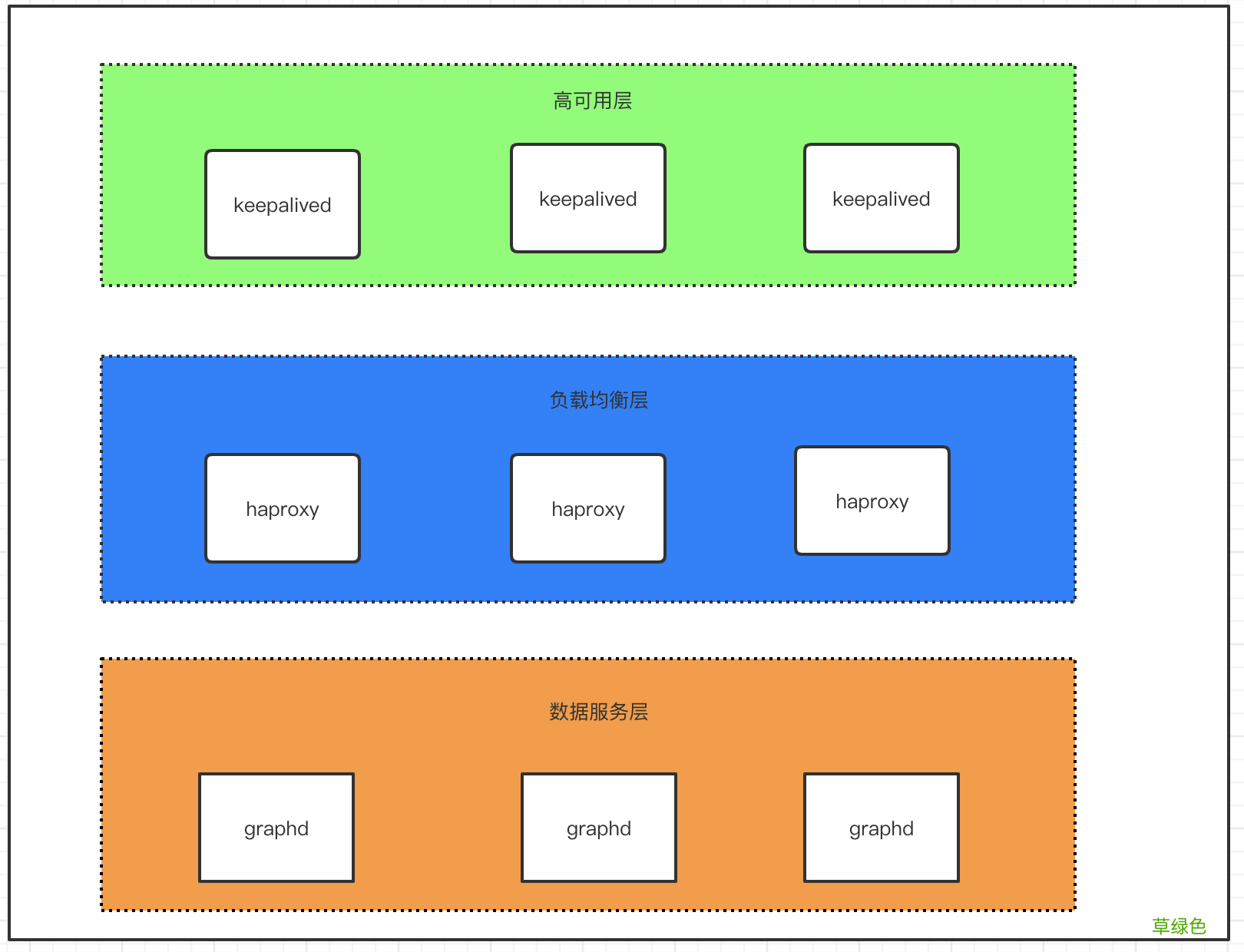
Nebula Graph的客户端目前(1.X)没有提供负载均衡的能力 , 只是随机选一个graphd去连接 。所以生产使用的时候要自己做个负载均衡和高可用 。
文章插图
图3.1
将整个部署架构分为三层 , 数据服务层 , 负载均衡层及高可用层 。如图3.1所示
负载均衡层:对client请求做负载均衡 , 将请求分发至下方数据服务层
高可用层: 这里实现的是haproxy的高可用 , 保证负载均衡层的服务从而保证整个集群的正常服务
3.1 负载均衡配置
haproxy使用docker-compose配置 。分别编辑以下三个文件
Dockerfile 加入以下内容
FROM haproxy:1.7 COPY haproxy.cfg /usr/local/etc/haproxy/haproxy.cfgEXPOSE 3640Dockerfile
docker-compose.yml加入以下内容
version: "3.2" services: haproxy:container_name: haproxybuild: .volumes:- ./haproxy.cfg:/usr/local/etc/haproxy/haproxy.cfgports:- 3640:3640restart: alwaysnetworks:- app_net networks: app_net:external: truedocker-compose.yml
haproxy.cfg加入以下内容
globaldaemonmaxconn 30000log 127.0.0.1 local0 info log 127.0.0.1 local1 warning defaults log-format %hr\ %ST\ %B\ %Ts log globalmode httpoption http-keep-alivetimeout connect 5000mstimeout client 10000mstimeout server 50000mstimeout http-request 20000ms# custom your own frontends && backends && listen conf #CUSTOMlisten graphd-clusterbind *:3640mode tcpmaxconn 300balance roundrobinserver server1 192.168.1.166:3699 maxconn 300 checkserver server2 192.168.1.167:3699 maxconn 300 checkserver server3 192.168.1.168:3699 maxconn 300 checklisten statsbind *:1080stats refresh 30sstats uri /stats3.2 启动haproxy
docker-compose up -d3.2 高可用配置
注:配置keepalive需预先准备好vip (虚拟ip) , 在以下配置中192.168.1.99便为虚拟ip
在192.168.1.166 、192.168.1.167、192.168.1.168上均做以下配置
安装keepalived
apt-get update && apt-get upgrade && apt-get install keepalived -y更改keepalived配置文件/etc/keepalived/keepalived.conf(三台机器中 做如下配置 , priority应设置不同值确定优先级)
192.168.1.166机器配置
global_defs {router_id lb01 #标识信息 , 一个名字而已; } vrrp_script chk_haproxy {script "killall -0 haproxy" interval 2 } vrrp_instance VI_1 {state MASTERinterface ens160virtual_router_id 52priority 999# 设定MASTER与BACKUP负载均衡器之间同步检查的时间间隔 , 单位是秒advert_int 1# 设置验证类型和密码authentication {# 设置验证类型 , 主要有PASS和AH两种auth_type PASS# 设置验证密码 , 在同一个vrrp_instance下 , MASTER与BACKUP必须使用相同的密码才能正常通信auth_pass amber1}virtual_ipaddress {# 虚拟IP为192.168.1.99/24;绑定接口为ens160;别名ens169:1 , 主备相同192.168.1.99/24 dev ens160 label ens160:1}track_script {chk_haproxy} }167机器配置
global_defs {router_id lb01 #标识信息 , 一个名字而已; } vrrp_script chk_haproxy {script "killall -0 haproxy" interval 2 } vrrp_instance VI_1 {state BACKUPinterface ens160virtual_router_id 52priority 888# 设定MASTER与BACKUP负载均衡器之间同步检查的时间间隔 , 单位是秒advert_int 1# 设置验证类型和密码authentication {# 设置验证类型 , 主要有PASS和AH两种auth_type PASS# 设置验证密码 , 在同一个vrrp_instance下 , MASTER与BACKUP必须使用相同的密码才能正常通信auth_pass amber1}virtual_ipaddress {# 虚拟IP为192.168.1.99/24;绑定接口为ens160;别名ens160:1 , 主备相同192.168.1.99/24 dev ens160 label ens160:1}track_script {chk_haproxy} }168机器配置
global_defs {router_id lb01 #标识信息 , 一个名字而已; } vrrp_script chk_haproxy {script "killall -0 haproxy" interval 2 } vrrp_instance VI_1 {state BACKUPinterface ens160virtual_router_id 52priority 777# 设定MASTER与BACKUP负载均衡器之间同步检查的时间间隔 , 单位是秒advert_int 1# 设置验证类型和密码authentication {# 设置验证类型 , 主要有PASS和AH两种auth_type PASS# 设置验证密码 , 在同一个vrrp_instance下 , MASTER与BACKUP必须使用相同的密码才能正常通信auth_pass amber1}virtual_ipaddress {# 虚拟IP为192.168.1.99/24;绑定接口为ens160;别名ens160:1 , 主备相同192.168.1.99/24 dev ens160 label ens160:1}track_script {chk_haproxy} }keepalived相关命令
# 启动keepalivedsystemctl start keepalived# 使keepalived开机自启systemctl enable keeplived# 重启keepalivedsystemctl restart keepalived四、其他
离线怎么部署?把镜像更改为私有镜像库就成了 , 有问题欢迎来勾搭啊 。

文章插图
到此这篇关于用Docker swarm快速部署Nebula Graph集群的文章就介绍到这了,更多相关Docker 部署Nebula Graph集群内容请搜索考高分网以前的文章或继续浏览下面的相关文章希望大家以后多多支持考高分网!
- 春季老年人吃什么养肝?土豆、米饭换着吃
- 三八妇女节节日祝福分享 三八妇女节节日语录
- 老人谨慎!选好你的“第三只脚”
- 校方进行了深刻的反思 青岛一大学生坠亡校方整改校规
- 脸皮厚的人长寿!有这特征的老人最长寿
- 长寿秘诀:记住这10大妙招 100%增寿
- 春季老年人心血管病高发 3条保命要诀
- 眼睛花不花要看四十八 老年人怎样延缓老花眼
- 香槟然能防治老年痴呆症? 一天三杯它人到90不痴呆
- 老人手抖的原因 为什么老人手会抖